The process of developing and implementing corporate-level software cannot overlook the central figure on whom the success of a new service implementation or service redesign depends: the user.
While organizations are increasingly concerned about the customer's situation, incorporating usability principles, research, and user/customer testing into the development of websites, applications, and digital interfaces in general, internal systems seem to leave the user adrift.
By internal corporate software user, we mean an executive in a call center or branch, a technician in charge of machinery, an assistant or collaborator using an ERP system, or another person within the organization in the context of their interaction with an information system as part of their work.
Have you seen an executive literally struggling with a computer system to solve a customer's problem? Or, worse, with several systems simultaneously. Why does talking about an ERP system often invoke nightmares?
Having to meet strict deadlines for going live should not become an excuse to disregard usability and internal user experience.
Training before launch should not be the panacea either. It is very likely that people in the organization have the ability to learn to use a new system. Even so, it is preferable to build easy-to-use systems and ensure a good user experience, rather than relying on training to compensate for the complexity of a system.
Extrapolating the definitions of usability that refer to ease of use for a given user in a given context, we can define the usability of a software component as the ability of a system to be "understood, learned, used, and attractive to the user, in a given context" (Bertoa, 2006).
-
Navigation: oversaturated screens with too much information.
-
Complex information architecture: hence the need for 36 clicks to reach the desired functionality.
-
Lack of personalization for a given user in a given context.
-
Systems that do not learn from user behavior in terms of frequent tasks or most viewed screens and do not adapt.
-
Systems that do not communicate with each other: therefore, the user must re-enter the same information on three different screens to perform a task that at first glance seems simple.
Why it is difficult to integrate usability and UX in a software development context
Like most major organizational challenges, the difficulties in getting an organization to incorporate usability practices and user research and testing into the software development process do not lie solely in resources and knowledge, but in people and organizational culture.
In this sense, software development is a complex creative and collaborative process where product quality depends not only on how it is developed and delivered but also on the people and the organization (Fuggetta, 2000).
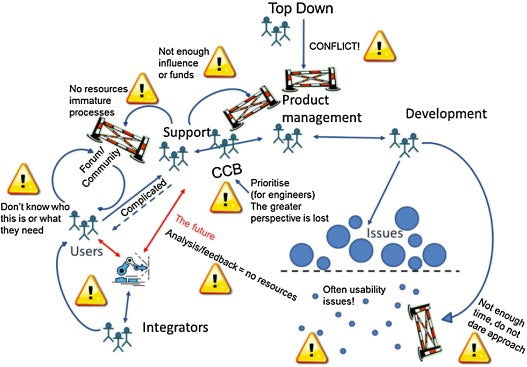
Some of the barriers found in previous studies conducted in large organizations such as ABB (Winter et al., 2014) are:
- Integrators can make unexpected changes to usability.
- Divergent interests at different levels of the organization create conflicts over resource use.
- Limited resources lead to task prioritization, and usability is not favored by this prioritization.
- Fear of technical consequences related to small usability-focused corrections.
- User feedback was perceived as difficult to manage.
- Poor understanding of user needs.
- The actor who best understands the user has little decision-making power.
- Economic and systematic barriers to contacting the user.
- Lack of knowledge about who the users are.
- Insufficient knowledge about how the product is used.
The following graph illustrates the findings of the ABB case:
An easy-to-use system impacts:
- the time needed to train future users,
- the amount of documentation needed for training,
- the time spent executing a task involving this system,
- people's motivation,
- the adoption time of new technology or information system, and
- the return on investment (ROI) in technology.
Incorporating usability principles into a client's ERP system at Deloitte increased productivity by 300%, reduced training time by 55%, and increased cross-selling and upselling by 21% (Deloitte, 2012).
Charles Phillips, CEO of Infor, decided to make usability and user experience (UX) a priority, based on the principle that good UX brings value to the business and the people who buy and use the software. According to Marc Scibelli, the Chief Creative Officer working with Phillips, the 3 big steps behind this transformational change were:
- Building the right internal team.
- Fostering collaboration.
- Going beyond good looks.
-
Foster collaborative work in multidisciplinary teams where developers, integrators, designers, and usability and user research experts are at the same work table.
-
Adopt user-centered design (UCD) as a work philosophy in daily operations and take every opportunity to observe and understand how the user uses the respective software, what other systems they use, and what their mental references are.
-
Make usability and user experience a priority at the organizational level, from top to bottom, and not just for the directly involved work team.
- Finally, to achieve synergy, it is important that people are at the center of the organization's practices, which obviously involves a change in organizational culture.
While senior employees may have more patience, having grown accustomed to complex information systems, we definitely need to question the frustration tolerance of Millennials – the generation of those between 20 and 30 years old – and how willing they are to struggle with an unfriendly system.
According to Marc Scibelli of Infor: “The next generation of software will learn patterns (of behavior), anticipate problems, and deliver solutions.”
- Bertoa, M., Troya, J., Vallecillo, A. (2006), Measuring the usability of software components, Journal of Systems and Software, pp. 427-439.
- Deloitte (2012), Enterprise Software: Why the User Experience Matters.
- Fuggetta (2000), Software process: a roadmap. En Finkelstenin, A. (Ed.), The Future of Software Engineering, ACM Press, Nueva York, pp. 25-34.
- Winter, J., Rönkkö, K., Rissanen, M., (2014), Identifying organizational barriers—A case study of usability work when developing software in the automation industry, Journal of Systems and Software, pp. 54-73.

 By
By 


![How to Convince Your Boss to Invest in Usability and User Experience [Updated 2021]](/content-images/331a6776-invertir-usabilidad-ux.jpg)