This introductory article is for sharing with your colleagues or superiors. If you're trying to convince your boss to invest in user experience (UX) and need to start from the basics, evangelizing is a good approach, especially by pointing to the ROI of UX investment.
While we frequently mention usability in digital interfaces as a quality attribute of a website, web application, mobile application, or software, we can talk about the usability of any tangible product or even a space, as the definitions below show.
"Usability really means making things work well." (Steve Krug)
"Usability is about the user's ability to perform specific tasks or achieve larger goals while 'using' what you are researching, improving, or designing, including services that don't involve 'something' like a doorknob or a web page." (Eric Reiss)
"A quality attribute that measures how easy web interfaces are to use." (Jakob Nielsen)
"The capability of the software product to be understood, learned, used, and attractive to the user, when used under specified conditions." (ISO 25010 Standard)
Donald Norman also speaks of "a philosophy based on the needs and interests of the user, with an emphasis on making products usable and understandable."
Loss of prospects, customers, and sales: It goes without saying that a user who cannot find what they are looking for, or who cannot complete a transaction or online purchase, is a lost customer. For an e-commerce store, usability problems can translate into a high shopping cart abandonment rate, a low average shopping cart value, a poor product mix/basket, a low return rate, etc.
Low profitability of SEM and online media campaigns: If you are paying to attract users to an unfriendly website, you are losing money. By optimizing the interface and ensuring a good user experience, you will make your campaign investment profitable.
Increased service costs: On a service website, a user who cannot find what they are looking for or cannot complete a transaction ends up frustrated. If they don't leave the site, at most they will call the call center. If, on the contrary, the site allows the customer to achieve their goals, call center support will not be necessary, and the web will be a profitable transaction channel.
Misdirected design and development resources: To the extent that the design, information architecture, and testing teams are not involved in development from the early stages, it is more likely that a product focused on the business but not on the customer is being built. This initial "saving" will generate greater losses in the long run, when, once the product is launched, it will be evident that it does not meet what the user needs.
At FREED, we have analyzed over 100 websites in detail in recent months, and some of the most frequent errors are related to:
-
Navigation and information architecture in general: from labels that do not illustrate the content actually included in each section of the site, to complex structures with several levels of content that are difficult to navigate.
-
Search engine and search results: unindexed content, poorly indexed content, or content that does not consider all page parameters.
-
Lack of optimization for mobile devices and excessively high loading times. This is no longer an option; it's a baseline. Remember that even Google's algorithm favors mobile-optimized sites.
-
Font size that does not favor on-screen reading.
-
Lack of critical information for making decisions related to transactional service flows or online purchases.
- Multiple alignments and visual clutter.
-
Inconsistencies in various dimensions, from navigation to content.
In a future article, we will show aggregated data to visualize frequent errors in more detail.
If usability answers the question "Could the customer achieve their goal on the website?", user experience is a broader concept that answers "Did the customer have a remarkable experience while interacting with the company?"
Peter Morville's honeycomb model illustrates well the difference between these two concepts: usability and user experience.
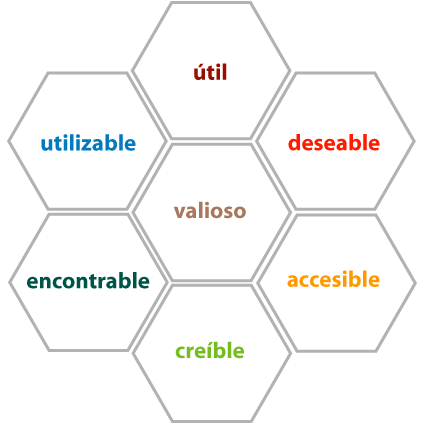
In an omnichannel context where customer experience is not limited to interaction with a single touchpoint, nor to a specific moment, the concept of "customer experience" is much broader and involves the design and management of the customer relationship throughout their lifecycle, from when they learn about the product/service, until they acquire it, use it, and in after-sales.
Taking an example from the e-commerce world, a usable website will make a potential user go from browsing to adding products to the shopping cart, making payment, and receiving order confirmation. A remarkable user experience ensures that the interaction exceeds expectations. For example, the site learns about the user, proposing relevant content, or interaction and micro-interaction elements accompany and guide a specific user during interaction in a given context.
On the other hand, a remarkable customer experience is one that ensures the product arrives within the promised time, the customer receives information proactively, the delivery person treats them well, the product is what they actually ordered, and the after-sales department ensures good follow-up service and support in case of failures, maintenance, etc.
In this case, the line between user experience and customer experience is very subtle. It is probably even unnecessary to differentiate as long as the goal of designing and ensuring remarkable experiences is met. However, in practice or when managing:
- UX is a responsibility that falls to UX design specialists (user experience), content, and information architecture,
- while CX (customer experience) is a responsibility of more cross-functional areas of the company.
Investing in usability testing and evaluation should be a continuous process that accompanies every digital project, from its earliest stage (requirements), to the prototyping stage, HTML construction, development/integration, and, once in production, as a continuous improvement.
For each stage of a project, there are appropriate methodologies and tools that allow for the greatest benefit from the testing process. We will go into more detail in a future article.
While there is no universal recipe or formula to determine how much to invest in usability and UX, an interesting proposal is the 10% rule proposed by Human Factors International (HFI), who recommend dedicating 10% of a digital development project to user experience.
Note: Do not confuse usability with usage or usage rate
For several years, we have observed the Spanish-speaking world, where the confusion between the terms "usability" and "usage" or "usage rate" is striking. The incorrect use of the term "usability" arises in the following type of statement: "the website has a lot of usability, we increased visits by 20%" or "the application has usability, up to 20,000 monthly users," and the examples can continue.
As usability and user experience professionals, we must take on the task of evangelizing around us, given that only by having interlocutors who speak the same language with the same concepts as us can we elevate the conversation and the scope of projects to a higher level.

 By
By 


![How to Convince Your Boss to Invest in Usability and User Experience [Updated 2021]](/content-images/331a6776-invertir-usabilidad-ux.jpg)