Before we look at how to apply usability and solution testing in a clinical context, I want to tell you that this article is part of a series I'm dedicating to usability and UX in healthcare. So I recommend you first go through the three previous publications and then come back here so we can move forward. The previous articles are: Usability, design and user experience (UX) in healthcare, UX Research in healthcare and UX Design and UX Research for prototyping healthcare services, all part of our guide to UX and usability in healthcare.
Once we have even the slightest prototype, but also as this prototype evolves and becomes a solution, we need to test. How? With users, absolutely. In person or remotely, with lab tests or a simulation, or in a real context.
And what will we want to test?
- First, the fundamental thing is task completion. We want to check whether the user can or cannot perform the tasks for which the system has been designed. What we want to measure here is not the user's capabilities but the system's ability to be used.
- We may also want to test information architecture. For example, in systems that are more complex and perhaps require several stages:
- menu navigation,
- the use of labels,
- what the buttons will be called,
- the different form fields, etc.
-
The content, considering that our system could be a website that, for example, speaks to different types of users. We can also test the comprehension of this content.
-
The overall design of the interface and the service.
-
The value proposition. It is common for a system to successfully pass usability tests but ultimately not be successful in terms of its value proposition. If we do a lab test or a simulation, for example, the person will be able to complete the task we ask them to perform with that system, but once the solution is available on the market, people will not necessarily adopt or buy it. Therefore, there is a difference between the concept, the functionalities, and the value proposition itself.
Generally, when preparing a usability test, we must design this protocol to know who we will test it with, when, what type of tasks we want the person to perform, etc.
- The first thing is to have a confidentiality agreement and informed consent. This is an agreement between us and the user participating in the test. We want the person to be comfortable, not to feel judged, to understand that we are testing an application and not their ability to perform a task.
- As an introduction, we will explain the development of the solution, what we are looking for with the product or service, how long the test will take, what we will do, what will be required of the person, etc.
- Entering the test, it usually starts with introductory questions to break the ice and, at the same time, explore motivations, perceptions, and attitudes, if necessary and depending on the context.
- We continue with the instructions which are of the type "I will show you a screen and I would like you to perform these tasks, to add a patient's data to the electronic record," etc.
- While the person performs the tasks, we will focus on observing. We can also ask them questions according to how the protocol has been designed. Their comments are important feedback.
-
Consider the context. For example, in a laboratory, everything is generally much more controlled, and the person has our full attention, the time is limited, there is an ambient temperature, the stress level might be lower, and there might be no distractions. If the test is conducted in an office or a factory, it is very likely that we will encounter completely different conditions. Therefore, when reporting the test results, it is important to describe the context in which it was conducted. In this video, you can see a very real situation.
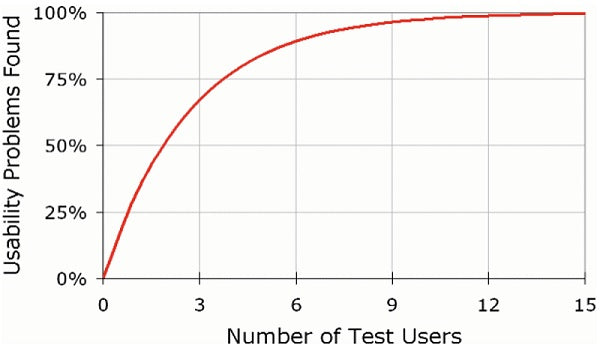
Generally, up to five users is a good number to uncover a large number of findings. Obviously, it will depend on the context, because if we have many and very heterogeneous user groups, the situation will be different than if they are homogeneous.
It is important to understand that it is preferable to do several tests with fewer users than a single testing stage with many. For example, if we have fifteen people, we can start with five testing the initial version of the prototype; then we improve that prototype based on the feedback we have received and test with five more, and so on. This way, the prototype undergoes continuous improvement.
Source: NNGroup.
Some metrics we look for in usability tests are:
-
The evaluation result of questionnaires such as the System Usability Scale.
-
Resolvability, for example, understanding what percentage of users completed tasks in less than 20 minutes.
-
Ease of performing a specific task.
-
Time required to execute a task.
There are several industry-accepted questionnaire models and evaluation instruments, but I would highlight the System Usability Scale. It consists of 10 questions that can be answered on a scale of 1 to 5, where 1 means completely disagree and 5 completely agree.
This is the typical list of questions that can be asked:
- I think I would like to visit this application / website / mobile site / system frequently.
- I found the application unnecessarily complex.
- I found the application easy to use.
- I think I would need the support of an expert to navigate the application.
- I found the various functionalities in the application well integrated.
- I found that there was too much inconsistency in the application.
- I imagine that most people would learn to use the application very quickly.
- I found the application awkward to use.
- I felt very confident using the application.
- I needed to learn many things before I could get going with the application.
It is important to choose an instrument, adapt it to our needs, and complement it with qualitative findings. We should not limit ourselves to a statistic like 60% of people completing the tasks. There is a richness in the comments and observations that we must capture.
What do you think of this article series? I will soon publish the fifth and final part, addressing the role of the UX researcher in healthcare. So stay tuned to the FREED Experience blog.
Main image by Laurynas Mereckas on Unsplash

 By
By