Website migration or redesign will always be a major project involving significant economic and human resources. Therefore, to make such a decision, we must have solid data and arguments to support it. This is achieved through analysis and research. In this article, we will review the most important factors you should consider and the tasks to perform before embarking on such a project.
Let's start with the basics. For any organization, a website redesign project is incredibly relevant as it will involve what is perhaps the main communication platform with its users and, incidentally, one of the supports for promoting its brand.
From this perspective, the first exercise you should undertake is an analysis of the website's current situation, considering it as:
- a communication medium,
- a sales channel,
- an after-sales platform,
- a showcase for the branding strategy, etc.
In that sense, start by checking off the following list of reasons that might lead you to decide that your organization's website needs a redesign:
- The site looks outdated or old.
- The visual identity no longer represents the organization or is not aligned with the brand and its target audience.
- There was a rebranding or a renaming or both.
- It no longer meets the needs of the target audience (users).
- A CMS is missing, the CMS is obsolete, or it does not meet the organization's needs.
- Data (analytics) and user feedback are lacking.
- The site is not integrated with other channels or services.
- It doesn't rank in search engines or there are errors.
- Users report experience problems.
- The site is a Frankenstein, and no one remembers how it came about.
The change can be gradual or radical:
- Continuous improvement (incremental changes).
- Continuous improvement followed by a radical redesign.
- Radical redesign.
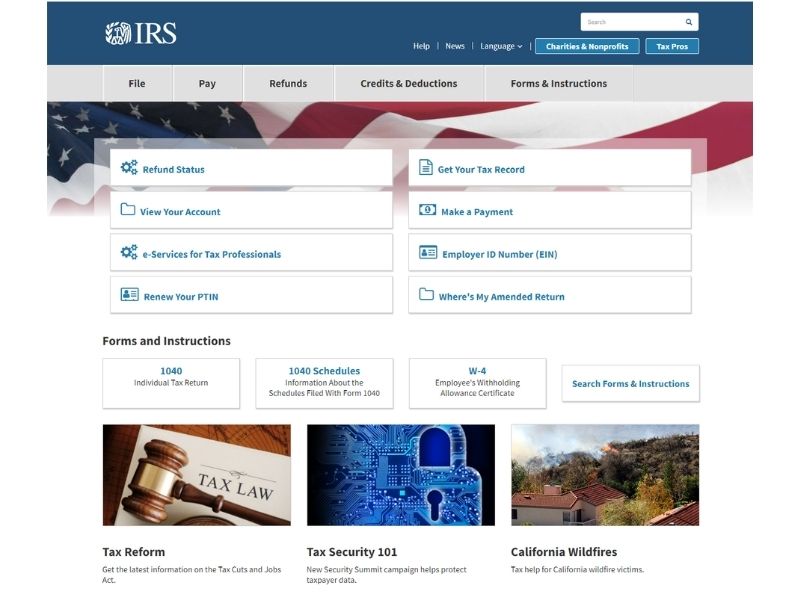
Let's look at an example of a continuous improvement process on a website:
The IRS website of the United States government in 2008
And this is what the IRS website looks like in 2021
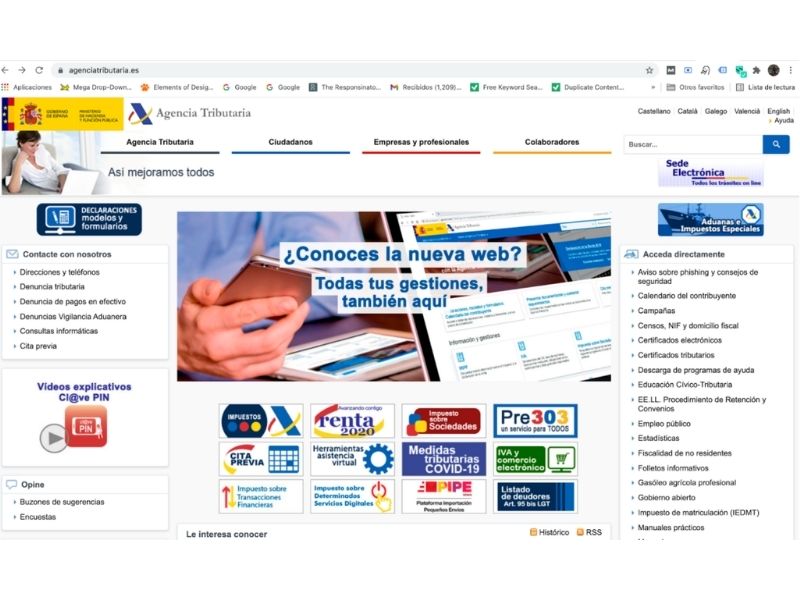
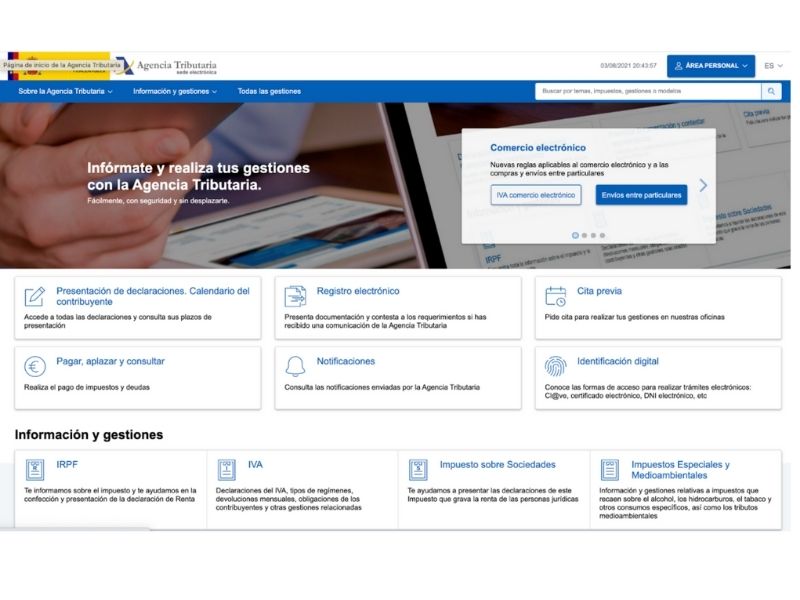
Now, let's look at an example of a radical website redesign:
This was the change made on July 15, 2021, to the website of the Tax Agency of the Spanish government.
BEFORE
AFTER
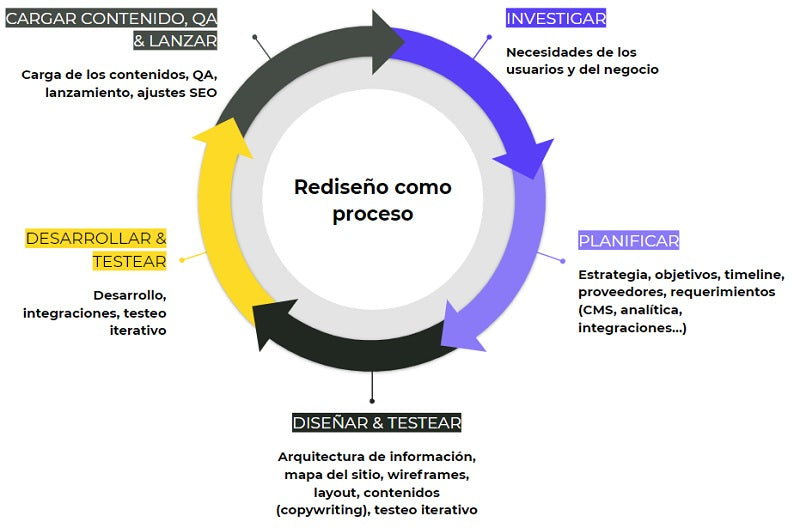
We can approach the redesign as a linear project or as a continuous improvement process.
Eventually, we should always be thinking about making improvements that respond to the needs of people (users and customers) and the business.
Obviously, we won't change information architecture every day.
The following illustration shows redesign as a continuous process:
Once you have analyzed the situation and your organization has decided that a website redesign is necessary, it is essential to conduct research that provides the data to lay the foundation for that project and establish objectives.
At this stage, you can ask a series of questions such as the following:
- Who visits the site today?
- Why do they visit the site?
- Which pages are most consulted?
- What is their performance?
- What unmet needs are there?
- What works well? (and should we keep)
- How has the site evolved over time?
- What do other similar sites in the world do well?
- How will we measure the success of the redesign project?
Once you have your series of questions, you need to find a way to answer them, as well as the sources that will provide you with the necessary data.
In this list, you will see possible research methods and data sources that could help you answer those questions:
- Web analytics (primary data).
- Surveys (open-ended question analysis).
- User interviews.
- Stakeholder interviews.
- Third-party data (Google search patterns).
- Benchmark and reference study.
- Expert usability and experience analysis.
- Page-level user feedback.
- Heatmaps.
- Session recordings.
- For example: A high percentage of returning users. This means they are already used to finding things in the same place. Even if it is not very usable for a new user, who might not find them as easily.
- There is seasonality in user needs.
- Percentage of users accessing from mobile devices: think "mobile first."
- Percentage of users moving from private to public sites: what about inconsistencies?
You can also resort to UX Research or user experience research, using methods such as customer archetypes or user personas.
By systematizing the qualitative data you obtain from techniques such as in-depth interviews, you will be able to answer the following questions:
- Who are the site users?
- advanced recurring
- basic recurring
- occasional
- new
- other users
- What characteristics do they have?
- In what context do they access the site?
- What are their objectives?
- Functional
- Emotional
- Social
After these analyses and investigations, it is very likely that you will detect current elements that work and that you want to keep in the website redesign project.
This is because not everything can be wrong, and they have characteristics that adequately meet usability and user experience (UX) requirements.
For example, here we see that the main menu of a website helps to segment users from the outset, immediately placing them in one of the available categories.
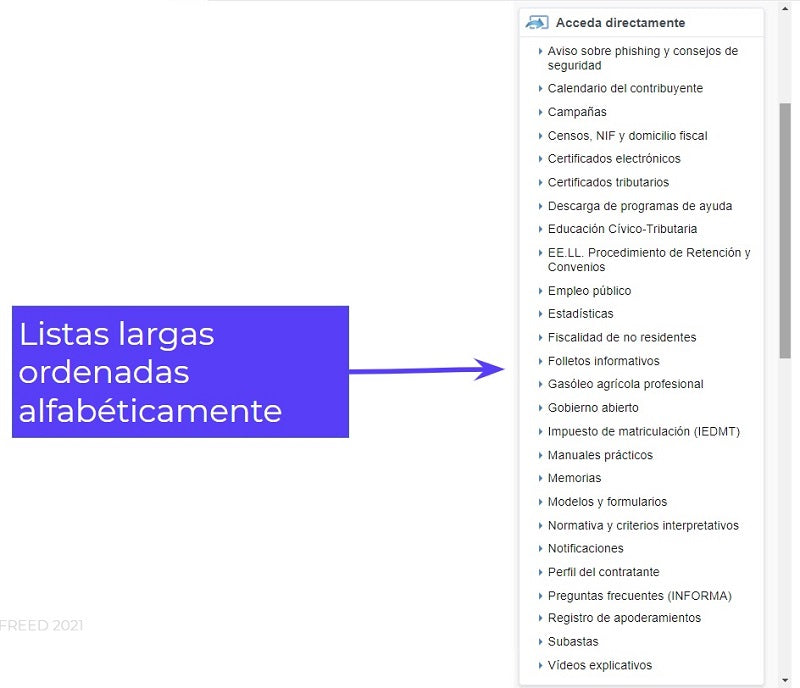
Here we see that the arrangement of the different services available on the website, in a list of shortcuts in alphabetical order, works perfectly by helping the user to quickly find what they were looking for.
When was the last time you did a benchmark?
For a redesign, we recommend doing a formal benchmark, that is, conducting a comparative analysis of your competitors, including content and functionalities, as well as looking for references that may have interesting content and interaction elements for the user experience.
Not to copy them but to open your mind.
For example, if you are thinking of changing platforms and migrating to Shopify, check out sites on Shopify to see what themes and applications they are using, how they are using them, and how their site performs.
The same applies if you are thinking of incorporating a chatbot: what reference sites make good use of this technology through a meaningful experience?
Content indexed in Google
Understanding what website content is indexed in Google will help you to:
-
Map hidden content or content you had "forgotten" because it is not easily accessible from the main navigation or content tree. Hidden content often exists when working with landing pages, running campaigns, and then taking those pages down.
- Know what redirects you need to make once your site is in production. This is because, eventually, each old URL will need to be redirected to an equivalent new URL or to the homepage, as appropriate. This will prevent frustration from 404 pages.
Source: Antevenio
It's about understanding search intent and aggregating all searches that point to the same intent.
This helps us prioritize content that responds to specific user needs.
Let's consider two specific cases:
- If your site is well-positioned for informational content searches, for example, "how to...", you obviously won't want to remove that well-positioned content but rather improve and enhance it.
- In turn, if your site is well-positioned for a series of products you no longer have, you might anticipate and:
- offer those products again, or
- ensure that content is not indexed (you will remove it from your website and make the necessary redirects) to avoid frustration.
Redesign is not just the “shell,” it is taking charge of the content
By content, we mean both texts and images (photographs, infographics, videos). The idea is to do a sweep to classify and evaluate the following:
- The content you will keep and improve because it is valuable and functional to the brand and what you want to communicate on the website.
- Among the content you will keep, you will find some that will need an update because data has changed over time.
- The content you will remove because it does not meet the objectives, because the product or service is no longer available, is obsolete, etc.
- Content that needs SEO optimization (keywords, Title, Meta description, ALT, etc.).
- The migration of content from one platform to another.
If there's one checklist you absolutely need for your website redesign project, it's this one.
You cannot leave loose ends such as unredirected pages or content lost when old pages are deleted.
Follow these points to ensure everything works well:
- Planning.
- Crawling.
- Content inventory.
- Information architecture.
- Definitions of current versus new content.
- Map old URLs.
- Monitor metrics.
- Define what happens to deleted pages.
- Resolve issues with:
- 404 errors: perform respective 301 redirects to operational pages.
- Report content to be excluded from Google indexing in Google Search Console.
Key element:
The content and SEO team must be involved from the beginning of the project, not the day before "going live" or, worse, after the migration.
This is because:
- the organic positioning strategy (SEO) must be developed before creating, editing, and publishing content, and
- a website redesign must respond to the content to be published and not the other way around.
To be able to track metrics, before and after a website redesign, as well as to find explanations for variations in them, it is essential to leave notes in Google Analytics.
The idea is to keep a record of all the changes you make, such as:
- The launch of a website redesign.
- The publication of a new page.
- The SEO optimization of a page.
- Start and end of an SEM campaign.
- Detection and correction of an error.
- A contingency (e.g., overdemand for a service due to a specific event).
For large sites with hundreds or thousands of pages, one strategy might be to migrate the site without waiting for all content to be complete and "perfectly" optimized.
It is preferable to migrate only a percentage of optimized content and publish the rest as a continuous improvement process.
Have you participated in website migration or redesign projects? What errors and successes would you highlight?

 By
By 





![Digital Marketing Strategy: Mistakes to Avoid [Part 2]](/content-images/ed2c5ae4-errores-comunes-marketing-digital.jpg)